
Entry V1 API (1.0.0)

Download OpenAPI specification:Download

Entry V1 API Documentation for device communication and scanning operations

User Flow

This section describes the complete flow for the Entry V1 scanner system.

Flow Diagram
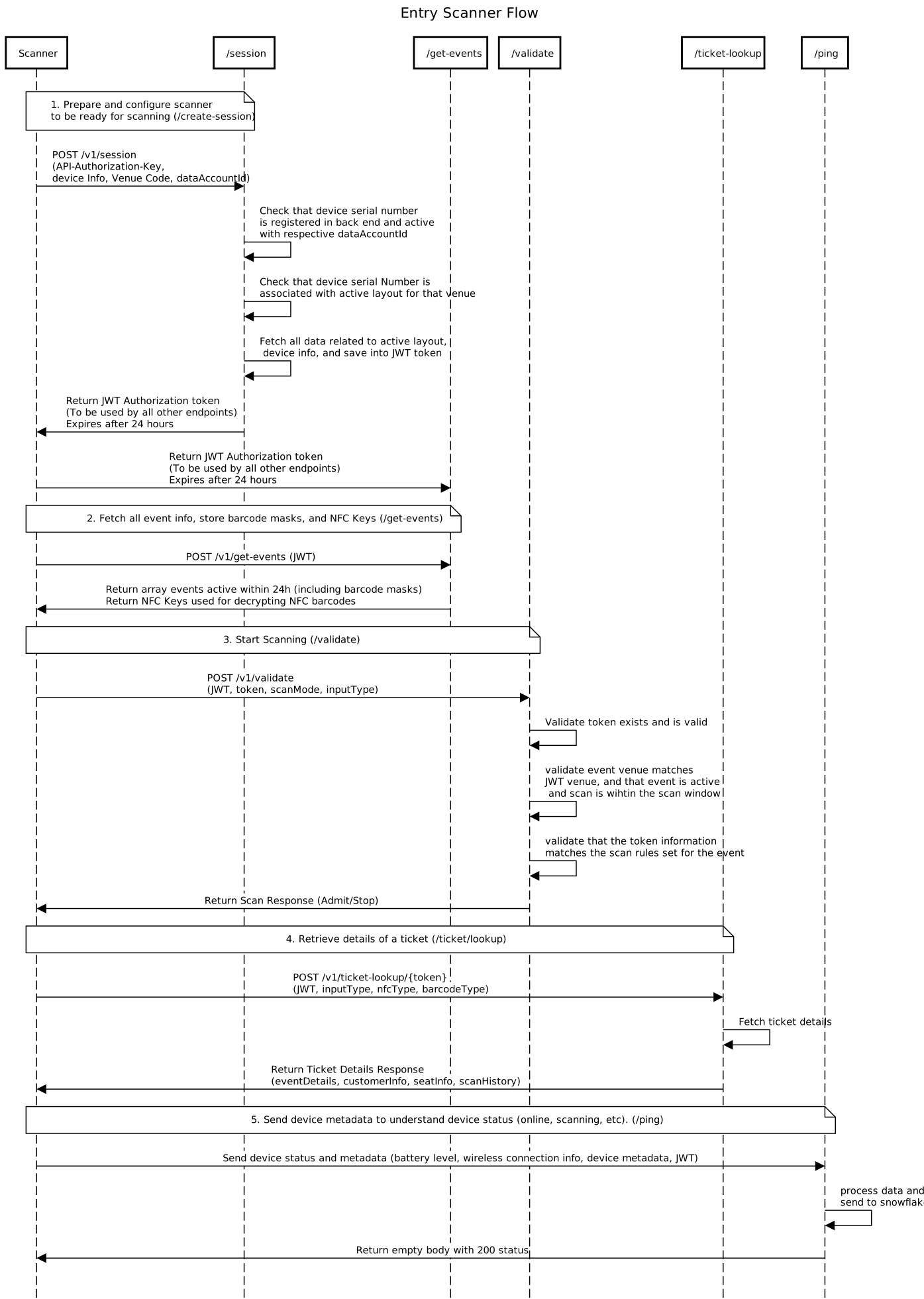
Entry Scanner Flow

Auth

Authentication

  • Most API calls require an Authorization: Bearer <bearer token> header, which is obtained by calling the session creation endpoint.
  • The session creation endpoint itself is secured using a manually issued API-Authorization-Key, provided to integrators during onboarding.

Create Session

Initializes a new device session and returns a bearer token (JWT) used for authentication on all subsequent API calls. This also registers device context including serial number, venue, and model details.

header Parameters
PAC-Request-Id
string

The integrator's external request ID for support traceablility and issue debugging.

API-Authorization-Key
required
string

The api-authorization-key to identify the client.

Content-Type
required
string
Default: application/json

The only supported request type for this endpoint is application/json.

Request Body schema: application/json
venueCode
required
string

Venue code from venue profile

dataAccountId
required
string

3-digit client identifier

serialNumber
required
string

Device serial number

make
required
string

Device maker

model
required
string

Device model

firmwareVersion
string

Firmware version of the device

softwareVersion
string

Software version of the device

macAddress
string

MAC address of the device

specialAreaId
string

Identifier for a special area within the venue (if applicable)

specialAreaName
string

Name of the special area within the venue (if applicable)

specialAreaMaxEntryPerTicket
integer

Maximum number of entries allowed for a ticket in the special area (if applicable)

specialAreaMaxCapacity
integer

Maximum capacity for the special area (if applicable)

specialAreaRequireEntryExit
boolean

Whether the special area requires both entry and exit scans (if applicable)

networkType
string or null
Enum: "Wifi" "Mobile" "Wired"

Device connected to internet.

wifiSSID
string or null

If connected through Wifi, what is the ssid.

wifiBSSID
string or null

If connected through Wifi, what is the bssid.

wifiChannel
integer or null

If connected through Wifi, what is the channel.

mobileProvider
string or null

If connected through Mobile, what is the provider.

networkSignal
string or null

Networking signal level on the reader device at the time of scan.

  • Wifi: dBm (decibel-milliwatts)
  • Mobile: Signal quality value (0 = No Signal/Unknown, 1 = Poor, 2 = Moderate, 3 = Good, 4 = Great)
  • Wired: Always 999
localIPAddress
string or null

Local IP address of the device.

softwareMode
string or null
Enum: "Handheld" "Pedestal"

Software mode of the device.

accessorySerialNumber
string or null

Serial number of the accessory.

accessoryFirmware
string or null

Firmware version of the accessory.

accessoryModel
string or null

Model of the accessory.

accessoryMake
string or null

Maker of the accessory.

deviceTimestamp
string <date>

Device date time in ISO format.

Responses

Request samples

Content type
application/json
{
  • "venueCode": "TS",
  • "dataAccountId": "390",
  • "serialNumber": "123456789",
  • "make": "Janam",
  • "model": "Model X",
  • "firmwareVersion": "1.0.0",
  • "softwareVersion": "android 2.0.0",
  • "macAddress": "00:11:22:33:44:55",
  • "specialAreaId": "123",
  • "specialAreaName": "VIP Entrance",
  • "specialAreaMaxEntryPerTicket": 2,
  • "specialAreaMaxCapacity": 100,
  • "specialAreaRequireEntryExit": true,
  • "networkType": "Wifi",
  • "wifiSSID": "string",
  • "wifiBSSID": "string",
  • "wifiChannel": 0,
  • "mobileProvider": "string",
  • "networkSignal": "string",
  • "localIPAddress": "string",
  • "softwareMode": "Handheld",
  • "accessorySerialNumber": "string",
  • "accessoryFirmware": "string",
  • "accessoryModel": "string",
  • "accessoryMake": "string",
  • "deviceTimestamp": "2019-08-24"
}

Response samples

Content type
application/json
{
  • "jwt": "eyJhbGciOiJSUzI1NiIsInR5cCI6IkpXVCJ9.eyJkZXZpY2VJZCI6MTAxOTM0LCJkZXZpY2VOYW1lIjoiTG9hZFRlc3QtSmFuYW0yIiwiZGV2aWNlTnVtYmVyIjozLCJzZXJpYWxOdW1iZXIiOiIxMjA1MjQzIiwidmVudWVOYW1lIjoiQmFzcyBDb25jZXJ0IEhhbGwiLCJ2ZW51ZUNvZGUiOiJCQVNTIiwiY2hlY2twb2ludExheW91dElkIjozMDE4NzA4MywiY2hlY2twb2ludExheW91dE5hbWUiOiJTcGVjaWFsIEFyZWEgRGVtbyIsImNoZWNrcG9pbnRMYXlvdXRDb2RlIjoiQ0wuODI2OSIsInNwZWNpYWxBcmVhSWQiOjc0NTQ5LCJzcGVjaWFsQXJlYU5hbWUiOiJWSVAgQ2FwYWNpdHR5Iiwic3BlY2lhbEFyZWFNYXhDYXBhY2l0eSI6Miwic3BlY2lhbEFyZWFNYXhFbnRyeVBlclRpY2tldCI6bnVsbCwic3BlY2lhbEFyZWFSZXF1aXJlRW50cnlFeGl0Ijp0cnVlLCJjaGVja3BvaW50SWQiOjIyMTAwNiwiY2hlY2twb2ludE5hbWUiOiJFbnRyeSBDYXBhY2l0eSIsInBhcnRuZXJJZCI6ImdyZWctdGVzdCIsImRldmljZVR5cGUiOiJoYW5kaGVsZCIsImRhdGFBY2NvdW50SWQiOiIxMjkiLCJhY2Nlc3NvcnlTZXJpYWxOdW1iZXIiOm51bGwsImFjY2Vzc29yeU51bWJlciI6bnVsbCwidmVudWVUaW1lem9uZSI6IkFtZXJpY2EvQ2hpY2FnbyIsImlhdCI6MTc3MDE1NDc0NiwiZXhwIjoxNzcwMjQxMTQ2fQ.kUteH6mBiali2I8UMWxovcMSrI3P_Pi96px3PKKi8BH34ifkzNfi_lUXXXze_9op7qg1WD1oFSO03piwz0ulxFbyl9p_KboHqRIkzC5cnY2XPgIHsINncCcnOpjTavwUPJhTdyp8dxW85cBb2lt8Dg-7ndE5lFdFJr9XHQtlGRgLAzpTgtrsjYh_jj3badY0q_5isiwFmqkZPQoBKJca86W2kS_6vBgizSXv2cVkQ7FPcUVjY-mGSj9EERyrU6Rqqm4cTvRh9jVrIYKCbrkp2tm2F4uE8SDHJvBAT4NzGG3G7vctxkOlBtjeyU4VZmyQsc3TB2BWP1kn_1Bh3B2u9Q"
}

Create Session (Lite)

Initializes a lightweight session for third-party integrators and returns a bearer token (JWT).

Unlike the standard session endpoint, this does not require full device layout information. The returned JWT has LIMITED access and can only be used with the Get Events and Ticket Lookup endpoints.

The integratorType claim in the JWT will be set to LIMITED.

header Parameters
PAC-Request-Id
string

The integrator's external request ID for support traceablility and issue debugging.

API-Authorization-Key
required
string

The api-authorization-key to identify the client.

Content-Type
required
string
Default: application/json

The only supported request type for this endpoint is application/json.

Request Body schema: application/json
dataAccountId
required
string

3-digit client identifier

serialNumber
required
string

Device serial number

venueCode
required
string

Venue code from venue profile

Responses

Request samples

Content type
application/json
{
  • "dataAccountId": "390",
  • "serialNumber": "123456789",
  • "venueCode": "TS"
}

Response samples

Content type
application/json
{
  • "jwt": "eyJhbGciOiJSUzI1NiIsInR5cCI6IkpXVCJ9.eyJkZXZpY2VJZCI6MTAxOTM0LCJkZXZpY2VOYW1lIjoiTG9hZFRlc3QtSmFuYW0yIiwiZGV2aWNlTnVtYmVyIjozLCJzZXJpYWxOdW1iZXIiOiIxMjA1MjQzIiwidmVudWVOYW1lIjoiQmFzcyBDb25jZXJ0IEhhbGwiLCJ2ZW51ZUNvZGUiOiJCQVNTIiwiY2hlY2twb2ludExheW91dElkIjozMDE4NzA4MywiY2hlY2twb2ludExheW91dE5hbWUiOiJTcGVjaWFsIEFyZWEgRGVtbyIsImNoZWNrcG9pbnRMYXlvdXRDb2RlIjoiQ0wuODI2OSIsInNwZWNpYWxBcmVhSWQiOjc0NTQ5LCJzcGVjaWFsQXJlYU5hbWUiOiJWSVAgQ2FwYWNpdHR5Iiwic3BlY2lhbEFyZWFNYXhDYXBhY2l0eSI6Miwic3BlY2lhbEFyZWFNYXhFbnRyeVBlclRpY2tldCI6bnVsbCwic3BlY2lhbEFyZWFSZXF1aXJlRW50cnlFeGl0Ijp0cnVlLCJjaGVja3BvaW50SWQiOjIyMTAwNiwiY2hlY2twb2ludE5hbWUiOiJFbnRyeSBDYXBhY2l0eSIsInBhcnRuZXJJZCI6ImdyZWctdGVzdCIsImRldmljZVR5cGUiOiJoYW5kaGVsZCIsImRhdGFBY2NvdW50SWQiOiIxMjkiLCJhY2Nlc3NvcnlTZXJpYWxOdW1iZXIiOm51bGwsImFjY2Vzc29yeU51bWJlciI6bnVsbCwidmVudWVUaW1lem9uZSI6IkFtZXJpY2EvQ2hpY2FnbyIsImlhdCI6MTc3MDE1NDc0NiwiZXhwIjoxNzcwMjQxMTQ2fQ.kUteH6mBiali2I8UMWxovcMSrI3P_Pi96px3PKKi8BH34ifkzNfi_lUXXXze_9op7qg1WD1oFSO03piwz0ulxFbyl9p_KboHqRIkzC5cnY2XPgIHsINncCcnOpjTavwUPJhTdyp8dxW85cBb2lt8Dg-7ndE5lFdFJr9XHQtlGRgLAzpTgtrsjYh_jj3badY0q_5isiwFmqkZPQoBKJca86W2kS_6vBgizSXv2cVkQ7FPcUVjY-mGSj9EERyrU6Rqqm4cTvRh9jVrIYKCbrkp2tm2F4uE8SDHJvBAT4NzGG3G7vctxkOlBtjeyU4VZmyQsc3TB2BWP1kn_1Bh3B2u9Q"
}

Device Communication Service

Device Communication Service

  • Endpoints for device management and communication
  • Includes event retrieval, venue information, and device status updates

Get Events

Retrieves a list of today's events available for scanning, along with critical configuration data such as barcode masks and NFC encryption keys used for offline validation.

header Parameters
PAC-Request-Id
string

The integrator's external request ID for support traceablility and issue debugging.

Authorization
required
string
Example: Bearer dGVzdDp0ZXN0

Authorization with Bearer Auth

Content-Type
required
string
Default: application/json

The only supported request type for this endpoint is application/json.

Request Body schema: application/json
networkType
string or null
Enum: "Wifi" "Mobile" "Wired"

Device connected to internet.

wifiSSID
string or null

If connected through Wifi, what is the ssid.

wifiBSSID
string or null

If connected through Wifi, what is the bssid.

wifiChannel
integer or null

If connected through Wifi, what is the channel.

mobileProvider
string or null

If connected through Mobile, what is the provider.

networkSignal
string or null

Networking signal level on the reader device at the time of scan.

  • Wifi: dBm (decibel-milliwatts)
  • Mobile: Signal quality value (0 = No Signal/Unknown, 1 = Poor, 2 = Moderate, 3 = Good, 4 = Great)
  • Wired: Always 999
localIPAddress
string or null

Local IP address of the device.

softwareMode
string or null
Enum: "Handheld" "Pedestal"

Software mode of the device.

accessorySerialNumber
string or null

Serial number of the accessory.

accessoryFirmware
string or null

Firmware version of the accessory.

accessoryModel
string or null

Model of the accessory.

accessoryMake
string or null

Maker of the accessory.

deviceTimestamp
string <date>

Device date time in ISO format.

Responses

Request samples

Content type
application/json
{
  • "networkType": "Wifi",
  • "wifiSSID": "string",
  • "wifiBSSID": "string",
  • "wifiChannel": 0,
  • "mobileProvider": "string",
  • "networkSignal": "string",
  • "localIPAddress": "string",
  • "softwareMode": "Handheld",
  • "accessorySerialNumber": "string",
  • "accessoryFirmware": "string",
  • "accessoryModel": "string",
  • "accessoryMake": "string",
  • "deviceTimestamp": "2019-08-24"
}

Response samples

Content type
application/json
{
  • "nfcKeys": {
    },
  • "events": [
    ]
}

Get Venues

Retrieves all venues configured for a given dataAccountId. Devices can use this to fetch newly-configured venues not present in the venue profile.

header Parameters
PAC-Request-Id
string

The integrator's external request ID for support traceablility and issue debugging.

API-Authorization-Key
required
string

The api-authorization-key to identify the client.

Content-Type
required
string
Default: application/json

The only supported request type for this endpoint is application/json.

Request Body schema: application/json
dataAccountId
required
string

3-digit client identifier

serialNumber
required
string

Device serial number

make
required
string

Device maker

model
required
string

Device model

networkType
string or null
Enum: "Wifi" "Mobile" "Wired"

Device connected to internet.

wifiSSID
string or null

If connected through Wifi, what is the ssid.

wifiBSSID
string or null

If connected through Wifi, what is the bssid.

wifiChannel
integer or null

If connected through Wifi, what is the channel.

mobileProvider
string or null

If connected through Mobile, what is the provider.

networkSignal
string or null

Networking signal level on the reader device at the time of scan.

  • Wifi: dBm (decibel-milliwatts)
  • Mobile: Signal quality value (0 = No Signal/Unknown, 1 = Poor, 2 = Moderate, 3 = Good, 4 = Great)
  • Wired: Always 999
localIPAddress
string or null

Local IP address of the device.

softwareMode
string or null
Enum: "Handheld" "Pedestal"

Software mode of the device.

accessorySerialNumber
string or null

Serial number of the accessory.

accessoryFirmware
string or null

Firmware version of the accessory.

accessoryModel
string or null

Model of the accessory.

accessoryMake
string or null

Maker of the accessory.

deviceTimestamp
string <date>

Device date time in ISO format.

Responses

Request samples

Content type
application/json
{
  • "dataAccountId": "129",
  • "serialNumber": "0000000999",
  • "make": "Janam",
  • "model": "XT3",
  • "networkType": "Wifi",
  • "wifiSSID": "string",
  • "wifiBSSID": "string",
  • "wifiChannel": 0,
  • "mobileProvider": "string",
  • "networkSignal": "string",
  • "localIPAddress": "string",
  • "softwareMode": "Handheld",
  • "accessorySerialNumber": "string",
  • "accessoryFirmware": "string",
  • "accessoryModel": "string",
  • "accessoryMake": "string",
  • "deviceTimestamp": "2019-08-24"
}

Response samples

Content type
application/json
{
  • "venues": [
    ]
}

Ping

Verifies connectivity between the device and the Entry API. Often used by the device to test network reachability, API availability, and basic request/response formatting.

header Parameters
PAC-Request-Id
string

The integrator's external request ID for support traceablility and issue debugging.

Authorization
required
string
Example: Bearer dGVzdDp0ZXN0

Authorization with Bearer Auth

Content-Type
required
string
Default: application/json

The only supported request type for this endpoint is application/json.

Request Body schema: application/json
geoLocation
string

GPS location data from device OS

batteryPercentage
number

Battery percentage from 0 to 100

accessoryBatteryPercentage
number

Accessory battery percentage from 0 to 100

testMode
boolean
Default: false

If true, the scan will be processed in test mode

networkType
string or null
Enum: "Wifi" "Mobile" "Wired"

Device connected to internet.

wifiSSID
string or null

If connected through Wifi, what is the ssid.

wifiBSSID
string or null

If connected through Wifi, what is the bssid.

wifiChannel
integer or null

If connected through Wifi, what is the channel.

mobileProvider
string or null

If connected through Mobile, what is the provider.

networkSignal
string or null

Networking signal level on the reader device at the time of scan.

  • Wifi: dBm (decibel-milliwatts)
  • Mobile: Signal quality value (0 = No Signal/Unknown, 1 = Poor, 2 = Moderate, 3 = Good, 4 = Great)
  • Wired: Always 999
localIPAddress
string or null

Local IP address of the device.

softwareMode
string or null
Enum: "Handheld" "Pedestal"

Software mode of the device.

accessorySerialNumber
string or null

Serial number of the accessory.

accessoryFirmware
string or null

Firmware version of the accessory.

accessoryModel
string or null

Model of the accessory.

accessoryMake
string or null

Maker of the accessory.

deviceTimestamp
string <date>

Device date time in ISO format.

Responses

Request samples

Content type
application/json
{
  • "geoLocation": "37.7749,-122.4194",
  • "batteryPercentage": "85",
  • "accessoryBatteryPercentage": "35",
  • "testMode": false,
  • "networkType": "Wifi",
  • "wifiSSID": "string",
  • "wifiBSSID": "string",
  • "wifiChannel": 0,
  • "mobileProvider": "string",
  • "networkSignal": "string",
  • "localIPAddress": "string",
  • "softwareMode": "Handheld",
  • "accessorySerialNumber": "string",
  • "accessoryFirmware": "string",
  • "accessoryModel": "string",
  • "accessoryMake": "string",
  • "deviceTimestamp": "2019-08-24"
}

Response samples

Content type
application/json
{
  • "error": {
    }
}

Scan Service

Scan Service

  • Endpoints for ticket validation and lookup
  • Handles barcode, NFC, and other ticket scanning operations

Validate Scan

Validates a ticket or token scanned at a checkpoint and returns admit/stop status, reason codes, and event/ticket context. This is the primary entry/exit validation endpoint used during live operations.

header Parameters
PAC-Request-Id
string

The integrator's external request ID for support traceablility and issue debugging.

Authorization
required
string
Example: Bearer dGVzdDp0ZXN0

Authorization with Bearer Auth

Content-Type
required
string
Default: application/json

The only supported request type for this endpoint is application/json.

Request Body schema: application/json
token
required
string

Barcode, access id, etc

inputType
required
string
Enum: "NFC" "Barcode" "Key" "Swipe"

Method used to read the ticket/token

scanMode
required
string
Enum: "Entry" "Exit"

Scanning operation mode

nfcType
string
Enum: "Apple" "Google"

If inputType is NFC, which wallet

barcodeType
string
Enum: "Barcode" "QRCode"

If inputType is barcode, which barcode symbology

testMode
boolean
Default: false

If true, the scan will be processed in test mode

networkType
string or null
Enum: "Wifi" "Mobile" "Wired"

Device connected to internet.

wifiSSID
string or null

If connected through Wifi, what is the ssid.

wifiBSSID
string or null

If connected through Wifi, what is the bssid.

wifiChannel
integer or null

If connected through Wifi, what is the channel.

mobileProvider
string or null

If connected through Mobile, what is the provider.

networkSignal
string or null

Networking signal level on the reader device at the time of scan.

  • Wifi: dBm (decibel-milliwatts)
  • Mobile: Signal quality value (0 = No Signal/Unknown, 1 = Poor, 2 = Moderate, 3 = Good, 4 = Great)
  • Wired: Always 999
localIPAddress
string or null

Local IP address of the device.

softwareMode
string or null
Enum: "Handheld" "Pedestal"

Software mode of the device.

accessorySerialNumber
string or null

Serial number of the accessory.

accessoryFirmware
string or null

Firmware version of the accessory.

accessoryModel
string or null

Model of the accessory.

accessoryMake
string or null

Maker of the accessory.

deviceTimestamp
string <date>

Device date time in ISO format.

Responses

Request samples

Content type
application/json
{
  • "token": "39000000000001",
  • "inputType": "Barcode",
  • "scanMode": "Entry",
  • "nfcType": "Apple",
  • "barcodeType": "Barcode",
  • "testMode": false,
  • "networkType": "Wifi",
  • "wifiSSID": "string",
  • "wifiBSSID": "string",
  • "wifiChannel": 0,
  • "mobileProvider": "string",
  • "networkSignal": "string",
  • "localIPAddress": "string",
  • "softwareMode": "Handheld",
  • "accessorySerialNumber": "string",
  • "accessoryFirmware": "string",
  • "accessoryModel": "string",
  • "accessoryMake": "string",
  • "deviceTimestamp": "2019-08-24"
}

Response samples

Content type
application/json
{
  • "status": "Admit",
  • "reasonCode": "OK",
  • "reasonMessage": "Good Ticket",
  • "eventId": "390:DEPLOY:TEST",
  • "eventName": "Event to test deploy",
  • "token": "39000000000001",
  • "ticket": "TBD",
  • "patronId": "3773396",
  • "firstName": "John",
  • "lastName": "Doe",
  • "testMode": false,
  • "seatInfo": {
    }
}

Ticket Lookup

Performs a lookup of ticket details using a token or barcode, often used by support or admin tools. Returns full ticket info, seating details, and scan history for troubleshooting purposes.

path Parameters
barcode
required
string

The ticket token to look up

header Parameters
PAC-Request-Id
string

The integrator's external request ID for support traceablility and issue debugging.

Authorization
required
string
Example: Bearer dGVzdDp0ZXN0

Authorization with Bearer Auth

Content-Type
required
string
Default: application/json

The only supported request type for this endpoint is application/json.

Request Body schema: application/json
inputType
string
Enum: "NFC" "Barcode" "Key" "Swipe"

Method used to read the ticket/token

nfcType
string
Enum: "Apple" "Google"

If inputType is NFC, which wallet

barcodeType
string
Enum: "Barcode" "QRCode"

If inputType is barcode, which barcode symbology

networkType
string or null
Enum: "Wifi" "Mobile" "Wired"

Device connected to internet.

wifiSSID
string or null

If connected through Wifi, what is the ssid.

wifiBSSID
string or null

If connected through Wifi, what is the bssid.

wifiChannel
integer or null

If connected through Wifi, what is the channel.

mobileProvider
string or null

If connected through Mobile, what is the provider.

networkSignal
string or null

Networking signal level on the reader device at the time of scan.

  • Wifi: dBm (decibel-milliwatts)
  • Mobile: Signal quality value (0 = No Signal/Unknown, 1 = Poor, 2 = Moderate, 3 = Good, 4 = Great)
  • Wired: Always 999
localIPAddress
string or null

Local IP address of the device.

softwareMode
string or null
Enum: "Handheld" "Pedestal"

Software mode of the device.

accessorySerialNumber
string or null

Serial number of the accessory.

accessoryFirmware
string or null

Firmware version of the accessory.

accessoryModel
string or null

Model of the accessory.

accessoryMake
string or null

Maker of the accessory.

deviceTimestamp
string <date>

Device date time in ISO format.

Responses

Request samples

Content type
application/json
{
  • "inputType": "Barcode",
  • "nfcType": "Apple",
  • "barcodeType": "Barcode",
  • "networkType": "Wifi",
  • "wifiSSID": "string",
  • "wifiBSSID": "string",
  • "wifiChannel": 0,
  • "mobileProvider": "string",
  • "networkSignal": "string",
  • "localIPAddress": "string",
  • "softwareMode": "Handheld",
  • "accessorySerialNumber": "string",
  • "accessoryFirmware": "string",
  • "accessoryModel": "string",
  • "accessoryMake": "string",
  • "deviceTimestamp": "2019-08-24"
}

Response samples

Content type
application/json
{
  • "eventId": "390:DEPLOY:TEST",
  • "eventName": "Event to test deploy",
  • "eventStartDateTime": "2025-01-01T10:00:00",
  • "eventEndDateTime": "2025-01-02T10:00:00",
  • "venue": {
    },
  • "offset": "-08:00",
  • "timeZone": "America/Los_Angeles",
  • "token": "39000000000001",
  • "ticket": "39000000000001",
  • "patronId": "3773396",
  • "firstName": "John",
  • "lastName": "Doe",
  • "seatInfo": {
    },
  • "scanHistory": [
    ]
}

Offline Scan Upload

Upload scan data collected while offline.

When the device is back online after a network issue, it notifies the server of the tickets that were scanned. The request payload is limited to 100 scans per request.

Path format: eventId => {dataAccountId:seasonCd:eventCd}

Note: The request payload must be raw gzip binary (not base64-encoded) for API Gateway to decompress correctly.

Creating the gzip file (example):

  • Save the JSON array to payload.json
  • Run: gzip -c payload.json > payload.json.gz
  • Upload using curl --data-binary @payload.json.gz with Content-Encoding: gzip
path Parameters
eventId
required
string

Event identifier in the format {dataAccountId:seasonCd:eventCd} Example: 111:AB:A1

header Parameters
API-Authorization-Key
required
string

Unique per vendor. Used to authorize this endpoint (devices may not have a JWT yet).

PAC-Request-ID
string

Integrator external request ID for traceability. If not provided, it will be automatically generated.

Content-Type
required
string
Default: application/json

Payload content type (the gzipped content represents JSON).

Content-Encoding
required
string
Default: gzip

Must be gzip.

Filename
required
string

Filename identifier in the format {serialNumber_timestamp}

Request Body schema: application/json

Raw gzip-compressed binary containing a JSON payload (array of offline scan batches).

string <binary>

Responses

Request samples

Content type
application/json
[
  • {
    },
  • {
    }
]

Response samples

Content type
application/json
{
  • "message": "Entry Offline Scan - Upload to S3 bucket entry-offline-scans successful at incoming/390/HUSKERS/LARGESCANTESTNFC/2026-02-13/1205243_feb_13_timestamp_here_11_07_am.json"
}